Creating a free obituary online can feel like one more task during an already difficult time. But it can also become a gentle way to honor someone’s life, share important service details, and give friends and family a place to gather, remember, and pay tribute.
This guide gives you a concise roadmap to publish a free memorial page. It covers what to include, how to use obituary templates, how to set up a memorial website, and how to share the page with the people who need it.
However you choose to remember them, a memorial wall brings loved ones together to share and preserve what mattered most.
A free online obituary does not need to be perfect. It just needs to tell the loved one’s life story with care and give others a simple way to visit, remember, and offer support.
Why Use a Free Online Obituary or Memorial Page
A free online obituary helps grieving loved ones share news of a death without needing to contact every person individually. Once the obituary online page is published, the family can easily share one link by email, text, or social media.
This matters when friends and family are spread across different cities, states, or countries. Not everyone can attend a funeral service in person, but many people still want to read the obituary text, offer condolences, share memories, or view favorite photos.
A free memorial can also remain available for years to come. Unlike a printed obituary that may be missed, an online memorial gives people a place to return on an anniversary, birthday, or quiet moment of remembrance.
Some paid memorial options include upgraded features, but many people choose a free online obituary because it provides the essentials at no cost: a page, photos, service details, and a place for personal stories.
What an Online Memorial or Memorial Website Includes
An online memorial is a digital page created to honor a loved one after death. It may include a standard obituary, photos, videos, service information, and messages from the community.
A memorial website usually includes the loved one’s full name, birth date, death date, location, life story, family details, and funeral arrangements. It may also include a gallery where family members can upload photos or short videos.
Many memorial pages allow visitors to post memories, condolences, and tributes. This can be especially meaningful when a father, mother, friend, spouse, or community member touched many people in different parts of the world.
A memorial site can be simple or more complete. Some pages focus only on the obituary. Others become a permanent memorial with stories, photos, videos, music, and messages of appreciation.
Publish a Free Online Obituary Quickly
The first obituary step is to collect the basic details. Start with the person’s full name, age, date of birth, date of death, and the city or location connected to their life or passing.
Next, choose a layout or obituary templates that match the tone. Some families want something formal and traditional. Others prefer a warmer tribute that feels more personal and conversational.
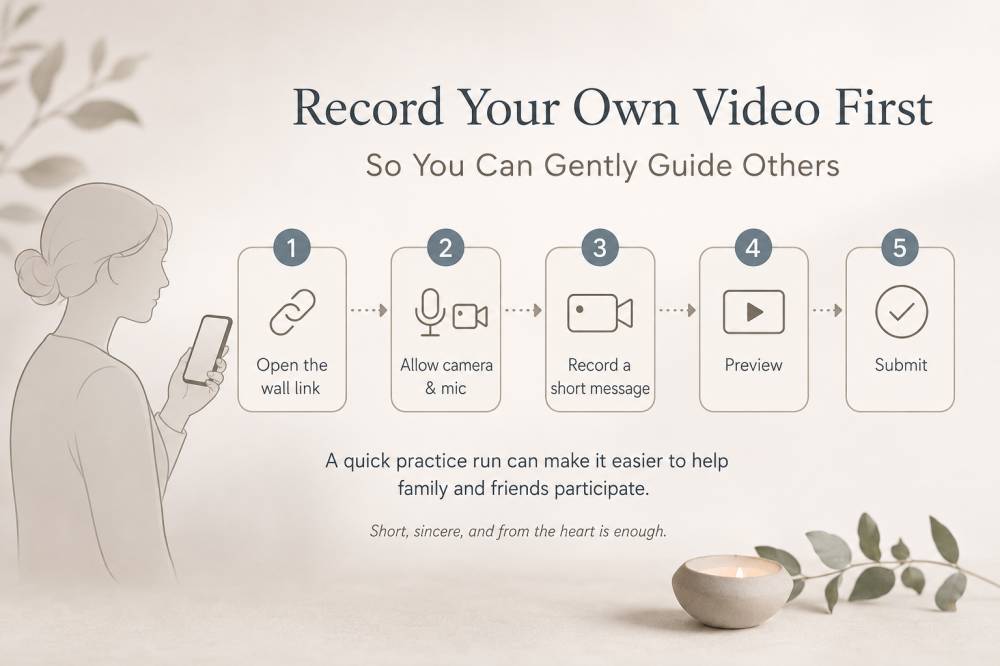
Then upload photos. Choose a clear main image and a few favorite photos from different stages of the loved one’s life. If the platform allows it, you can also upload videos or include a video tribute, or even collect video messages from friends and family to play as part of the remembrance.
Add funeral arrangements, memorial service details, visitation times, donation requests, or any family preferences. If there is no public service, say that clearly and gently.
Finally, publish the custom memorial page and copy the shareable link. Send it to friends and family so they can visit, read, and contribute.
Use Obituary Templates and Sample Text
There is no required format for writing an obituary. Writing an obituary is standard practice after a death, even though every family chooses a different tone and level of detail. Obituary templates help you begin.
Here is a simple standard obituary template:
“[Full name], age [age], of [location], passed away on [date]. [He/She/They] was born on [birth date] to [parents’ names]. [Name] will be remembered for [qualities, work, relationships, passions]. [He/She/They] is survived by [surviving family members]. Service details will be held at [location/date/time].”
Here is a warmer tribute-style template for a more heartfelt and wonderful remembrance:
“[Name] lived a life filled with [love, humor, service, creativity, faith, adventure]. Those who knew [him/her/them] will remember [specific qualities or memories]. [Name] brought [comfort, laughter, wisdom, strength] to family, friends, and community. We invite you to share memories and photos as we honor [his/her/their] life.”
Here is a short obituary template:
“[Full name] passed away on [date] at the age of [age]. [He/She/They] will be deeply missed by family members, friends, and all who knew [him/her/them]. A memorial service will be held on [date] at [location].”
You can copy these template files into a document, edit the names and details, and adjust the tone until it feels right.
How To Write an Obituary Online for Your Loved One
Start with one clear sentence about the passing. This does not need to include every detail. A simple opening such as “[Name] passed away peacefully on [date] at the age of [age]” is enough.
Then include family details. Obituaries often mention surviving family members, such as spouse, children, parents, siblings, grandchildren, and close relatives. They may also mention predeceased relatives.
After that, summarize the loved one’s life. Include career highlights, meaningful accomplishments, military service, education, hobbies, faith, community involvement, or the parts of life that mattered most to the person.
Try to include a few personal details. A beautiful tribute usually includes more than dates. It may mention favorite sayings, favorite places, the way they welcomed people, or the spirit they brought into a room, similar to how meaningful milestone celebrations highlight someone’s life story and relationships.
End with service details and memorial preferences. This may include funeral arrangements, a memorial donation request, flowers, private family service information, or instructions for a virtual memorial.
However you choose to remember them, a memorial wall brings loved ones together to share and preserve what mattered most.
Tips To Invite Friends And Family To Share Memories
Once the memorial page is live, invite people to contribute. Send the link by email, text, or social platforms with a short message.
For example:
“We created a free online memorial for [Name] so friends and family can share memories, photos, and condolences. Please visit the page when you’re ready, and feel free to add a story or message.”
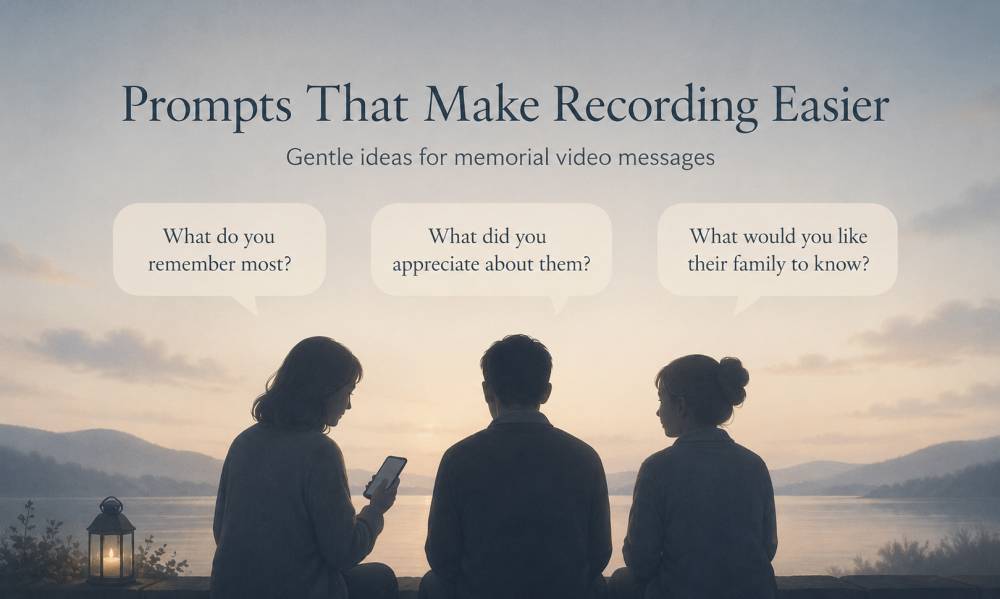
Prompts can help people write. Try simple questions: “What is one memory you’ll always carry?” “What did you appreciate about them?” “What is one story that captures who they were?” You can also gather these responses as a shared video birthday tribute wall if you are honoring someone around a milestone.
If the page allows guest submissions, set clear moderation rules. You may want to approve posts before they appear publicly, especially during a sensitive time.
Making the Memorial Page a Permanent Memorial
A permanent memorial gives loved ones a place to return over a lifetime. Online memorials can be visited for years to come, which matters when grief changes over time.
Check whether the memorial website remains online permanently or whether free pages expire. Some other services offer free pages but charge for upgrades, storage, or longer-term hosting.
Keep backups of the obituary text, photos, videos, and comments. Export the page content when possible, or save a PDF copy for family records.
If long-term access matters, consider a custom domain, printed archive, or saved family folder. The goal is to protect the legacy and make sure the remembrance remains available.
Privacy, Permissions, and Moderation Settings
Before publishing, decide whether the page should be public or private. A public page is easier for people to find and share. A private page may feel safer for sensitive family situations.
Consider who can post memories, share photos, or upload photos and videos. Some families allow anyone with the link to contribute. Others prefer approval before anything appears.
Use moderation for sensitive content. If a message causes distress, contains private information, or feels inappropriate, it is reasonable to remove it or ask the person to revise it.
Security and care matter. A memorial page should feel like a safe place to honor someone, not another source of stress.
Free Obituary and Memorial Resources to Know
Several free online resources can help with research, archives, and memorial creation. USGenWeb Project provides free genealogical records and may include obituary archives or local cemetery information, while guides on creating meaningful milestone celebrations and video messages can inspire how you structure stories and tributes.
FamilySearch is a free site with searchable obituary-related collections and family history records. Obituary Daily Times is a volunteer-maintained searchable obituary index, useful for locating obituary references.
Chronicling America is a free database of historic newspapers, which can help when researching older obituaries. Local libraries often provide remote access to premium newspaper archives, depending on your library card and location.
Legacy.com partners with local newspapers and funeral homes to provide access to obituaries. Many funeral homes also provide complimentary obituary pages on their own websites as part of their services.
For publishing, people may use services such as Ever Loved, which allows obituary sharing through a custom link; FuneralFolio, which offers a free obituary maker with no hidden fees; Remembered.com, where creating a memorial website is free; and BlueButterfly, which allows free online obituaries and memorial pages.
Always review the terms, privacy settings, and cost details before creating any account or publishing personal information.
Frequently Asked Questions About Free Memorials
Is an obituary online service truly free?
Some services are completely free, while others offer a free version with paid upgrades. Look for details about hosting, ads, storage, visitor access, and whether downloads or customization cost extra.
How long does a memorial page remain accessible?
That depends on the platform. Some memorial websites say pages can remain available permanently, while others may have limits. Save backups of your obituary text, photos, and visitor messages.
Do I need an account to publish?
Some memorial website services require an account to create or manage a page. Others allow free obituary creation with little or no account setup. Check before you begin.
Can friends post memories and condolences?
Many memorial pages allow visitors to share memories, condolences, personal stories, photos, and videos. You can usually choose whether posts appear immediately or require approval.
What should an obituary include?
An obituary typically includes full name and age, date of birth, date of death, family members, life story, accomplishments, service details, and memorial preferences.
Final Steps: Create Your Free Memorial Website
Start by choosing a template. Then write one clear opening sentence, add the key details, and include a few personal memories that reflect the loved one’s life.
Next, choose favorite photos, add funeral or service details, and decide whether the memorial page should be public or private. Invite friends and family to share memories when the page is ready.
Creating a free obituary online is not just about publishing information. It is about making a place for remembrance, support, and connection during a difficult time.
Pick a template, start writing, and create a free memorial website that honors the person with care.
However you choose to remember them, a memorial wall brings loved ones together to share and preserve what mattered most.